Instagram Audio Guide
How to Download Audio from Instagram Reels as MP3
Learn how Instagram's saved sounds differ from a standalone MP3, how to extract available audio from a supported public Reel and what affects the quality of the resulting file.
Quick answer
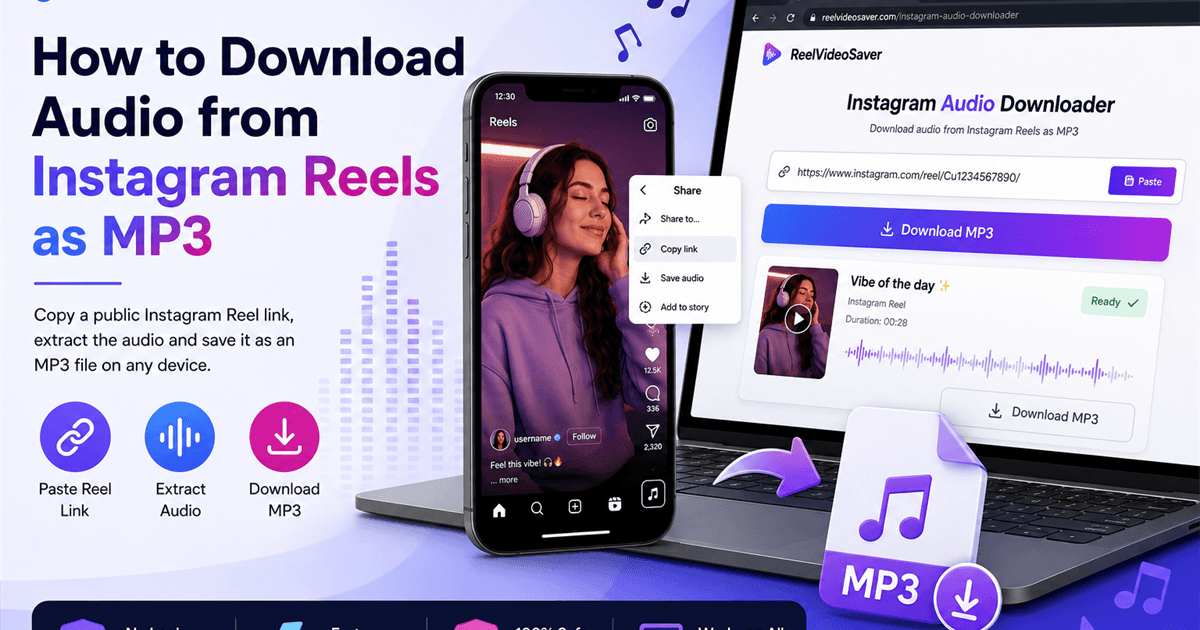
Copy the URL of a supported public Instagram Reel, paste it into the ReelVideoSaver Instagram Audio Downloader, process the media and download the available audio as an MP3.
Instagram Reels can contain music, original audio, spoken commentary, interviews, sound effects or several of these elements together. If you only need the soundtrack, saving the entire video may be unnecessary when a compatible audio result is available.
Before downloading, it helps to understand what you are actually creating. Instagram's own Save audio feature is part of the Instagram experience, while an MP3 download creates a separate audio file that your device can store and play independently.
Save audio in Instagram vs download an MP3
Save audio inside Instagram
Instagram's Save audio feature is useful when you want to return to a sound later or use an available sound while creating content inside Instagram. It does not normally create a standalone MP3 in your Downloads folder.
Download an MP3
An MP3 is a separate audio file that can be stored in your device's file system and played with compatible software. It is a different workflow from saving a sound within Instagram.
Important: Only download or reuse audio that you own, have permission to use, or are otherwise legally authorized to save and use.
How to download Instagram Reel audio as MP3
The process is designed around a public Reel URL. You do not need to provide your Instagram password to use a public-link workflow.
- 1
Copy the individual Reel link
Open the Reel in Instagram, choose Share and tap Copy link. On desktop, copy the complete address of the individual Reel page rather than a profile, search or collection URL.
- 2
Open the Instagram Audio Downloader
Open ReelVideoSaver's Instagram Audio Downloader in Safari, Chrome, Edge or another modern browser. The public-link workflow does not require your Instagram password.
- 3
Paste and process the Reel
Paste the Reel URL and start processing. The service checks whether compatible public media and an audio track are available for the submitted link.
- 4
Download the available MP3
When an audio result is available, review it and choose the MP3 download option. Your browser then handles the file according to its normal download settings.
Try the Instagram Audio Downloader
Paste a supported public Reel URL and check whether a compatible audio result is available.
Open Instagram Audio DownloaderDownloading Reel audio on iPhone
Copy the Reel link from Instagram and open Safari. Visit the Instagram Audio Downloader, paste the URL and process it. When an MP3 result is available, select the download option.
Safari normally makes downloaded files available through its Downloads control and the Files app. Depending on your iPhone settings, the file may be stored under iCloud Drive or On My iPhone.
Where to look: Safari Downloads → Files app → Downloads.
Downloading Reel audio on Android
Copy the Reel URL, open Chrome or another modern browser and paste it into the Instagram Audio Downloader. After processing, choose the available MP3 result.
Chrome normally places downloaded audio in Downloads. You can also open Chrome's Downloads screen or use your phone's Files, My Files or another file manager application.
MP3 is supported by most common music players, but the exact playback and library behavior depends on the device and app.
Downloading Reel audio on Windows or Mac
Open the individual Reel in a desktop browser and copy its full address. Paste the URL into the audio downloader and process the media. When an MP3 result is available, select Download.
Use the individual Reel address rather than a creator profile URL, search page or unrelated Instagram link.
What determines Instagram Reel audio quality?
Audio quality begins with the source recording. If the original Reel contains distorted, noisy or heavily compressed audio, an extraction tool cannot recreate detail that was never present in the available source.
There are several stages between recording and the MP3 you eventually receive: the creator's original recording, Instagram's media processing, the audio track made available with the media, and the final conversion or encoding used for the downloaded file. Each stage can affect the result.
Why two Reels can sound different
1. The original recording
A clean microphone recording and a noisy phone recording will not produce the same result, even if both are converted to MP3.
2. Platform processing
Social platforms process uploaded media. The audio available from a Reel may therefore differ from the creator's original uncompressed recording.
3. MP3 encoding
MP3 is a compressed audio format. Converting audio to MP3 can make it convenient to store and play, but it does not improve the underlying recording.
A higher bitrate or different file setting cannot restore frequencies or detail that were already removed earlier in the process. If the source is already compressed, repeated conversion can also affect the final sound.
Source recording matters
The original recording, microphone quality, background noise, platform processing and available media all influence the final result.
MP3 is a file format
MP3 makes audio convenient to store and play, but converting a file does not turn a low-quality source into a high-quality recording.
What if a Reel contains music and spoken voice?
A Reel can contain several sounds at once, including background music, narration, dialogue, environmental noise and sound effects. When those elements are delivered as one mixed soundtrack, downloading the audio normally gives you that combined soundtrack.
Extracting the available audio is different from separating individual instruments or voices. An ordinary audio downloader does not automatically turn a mixed Reel soundtrack into separate music and speech tracks.
When Instagram Reel audio is unavailable
A failed audio result does not necessarily mean there is something wrong with your phone or computer. Public media can change, become unavailable or require access that a public-link workflow cannot use.
The Reel belongs to a private account or requires access that is not publicly available.
The Reel was deleted, restricted, archived or otherwise made unavailable.
The submitted URL points to a profile, search page or another location instead of the individual Reel.
The available media does not contain a compatible audio track.
A browser extension, privacy filter or network setting is interfering with processing.
Instagram has temporarily changed how the public media is delivered.
The Reel plays in Instagram, but the download does not work
This can happen because the ability to watch a Reel in the Instagram app is not the same as making the same media publicly retrievable through an external public-link workflow.
For example, Instagram may be using your logged-in session, applying access controls, serving a media variant that is not currently available to the downloader, or changing how the public media is delivered. A Reel can therefore play normally for you while an external request cannot retrieve a compatible audio source.
Things worth checking first
- • Copy the link again directly from the Reel's Share menu.
- • Make sure the link identifies the individual Reel.
- • Check whether the Reel is publicly accessible without your Instagram session.
- • Try again later if Instagram's public media delivery has temporarily changed.
- • If another public Reel works but this one does not, the issue may be specific to the unavailable Reel or its media.
If the Reel opens normally in Instagram, copy its URL again directly from the Share menu. You can also test the individual URL in a private or incognito browser window to see whether the page is publicly accessible without your account session.
Copyright and responsible use
Music, spoken recordings, sound effects and other audio can be protected by copyright or other rights even when a Reel is publicly visible. Downloading an MP3 does not transfer those rights to you.
Do not provide your password
A public-link downloader should not require your Instagram credentials.
Use the individual Reel URL
Submit the media address needed for processing rather than unnecessary account information.
Check the audio rights
A song or recording may belong to someone other than the Reel creator.
Get permission for reuse
Check ownership or licensing before using downloaded audio in new public or commercial content.
Frequently asked questions
Can I download audio from every Instagram Reel?
No. The Reel must be publicly accessible and supported, and the available media must contain a compatible audio track. Private, deleted, restricted or otherwise unavailable Reels may not work.
What is the difference between Save audio and an MP3 download?
Instagram's Save audio feature keeps a sound available inside Instagram for later use. An MP3 download creates a separate audio file that can be stored on your device.
Does ReelVideoSaver require an Instagram login?
No. The public-link workflow does not ask for your Instagram username or password.
Can I download Instagram Reel audio on an iPhone?
Yes, when the Reel is supported. Use Safari, download the prepared MP3 and check Safari Downloads or the Files app for the completed file.
Where is the MP3 stored on Android?
Chrome and many Android browsers normally save downloaded files in Downloads. You can also check the browser's Downloads screen or your device's file manager.
Why does Instagram Reel audio quality vary?
The result depends on the audio available from the Reel. The original recording, Instagram processing and compression can affect clarity, and converting to MP3 cannot restore detail that has already been lost.
What happens if a Reel contains music and spoken voice?
If the available source contains a mixed soundtrack, the audio result generally represents that soundtrack as a whole. A downloader does not automatically separate music from speech.
Can I use a downloaded MP3 in my own video?
Only when you own the audio or have the necessary permission and rights. Downloading publicly accessible audio does not automatically grant permission to republish or monetize it.
Related ReelVideoSaver guides and tools
Instagram Audio Downloader
Extract compatible audio from supported public Instagram Reels and video posts.
Download Instagram Reels in HD
Learn how video quality works and how to save a supported Reel on different devices.
Instagram Reels Downloader
Download supported public Instagram Reels as compatible video files.
Instagram Video Downloader
Download supported public Instagram video posts.